Your Link in Bio Should Sell Something: Meet Foyer Butler
Foyer Butler turns the products and deals you already track into a shoppable link-in-bio page, with a subscriber list and analytics built in. The page is free to keep.
By The Influencer Butler Team · October 13, 2026 · 7 min read
Every bio you own gets exactly one link. Most creators spend it on a page that lists a handful of buttons and earns nothing on its own. The link goes out in every caption, every video description and every "link in bio" reply, and then it lands on a page that was never built to sell.
Foyer Butler is the fix. It is a butler inside the Influencer Butler desktop app that builds you a shoppable link-in-bio page out of the products you already track, keeps your live deals on it, collects subscribers, and shows you what every tap did. It lives under the Link Butler group in the app, and the full walkthrough is in the Foyer Butler tutorial. This post is the why and the shape of it.
What a foyer is, and why that name
A foyer is the entrance hall. People come through it on the way to everything else in the house. Your bio link works the same way: it is the one door every platform sends people through. Foyer Butler makes that door do a job. Instead of a page of plain buttons, shoppers land on your picks, your storefront's deals of the day, and a way to join your list.
Your page lives at links.influencerbutler.com/@yourhandle. On a paid plan you can also put it on your own domain, and the page then answers at both addresses.
See one in the wild
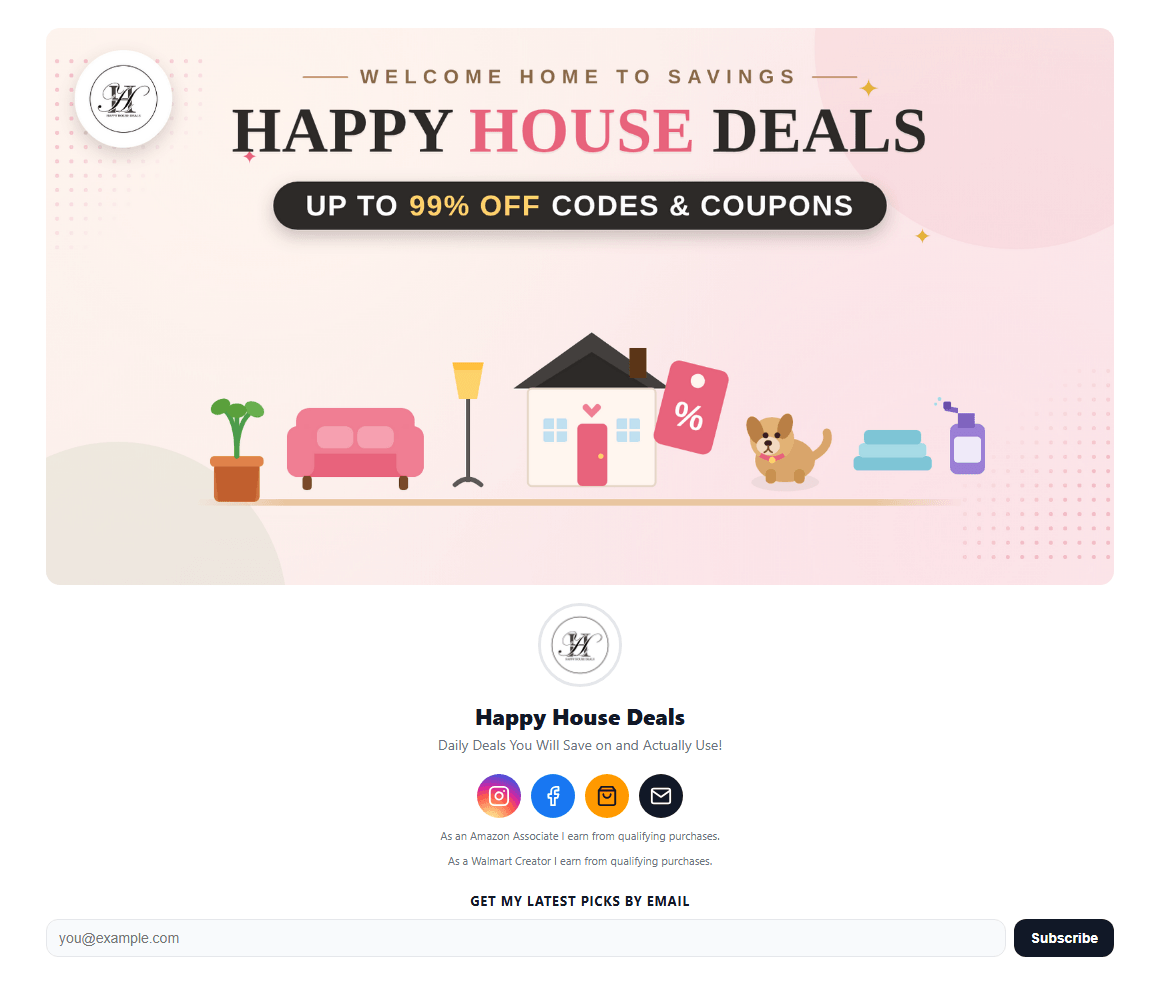
Here is a real one: Happy House Deals, a deals account's Foyer page. A hero banner across the top, the avatar and bio, a row of social icons, both affiliate disclosures, an email sign-up, a pinned favorite find with a one-line note, and then a Today's Deals section with dozens of live deals sorted into categories. The whole thing was built inside the app from deals the account was already posting.
What goes on the page
Everything on your page is a tile, and every tile is a tracked Butler Link. That matters more than it sounds. It means the page is not a dead end: every tap shows up in your Link Performance dashboard next to the rest of your links, so you can tell which products on the page actually get touched.
Here is what you can put on it:
- Product tiles. Paste any product link into Add a product and it becomes a tile. If you route links through a deep-link provider (GeniusLink, URLGenius, LinkTw.in or Mavely), pick it once under API Integrations and new tiles follow it.
- Headings. Plain section headings so the page reads like a shop with aisles, not a list.
- Today's Deals. A live grid of your Amazon, Walmart and TikTok Shop deals, the same ones your Deals Butlers post. It refreshes itself. More on this in a follow-up post.
- A booking tile. If you take calls or consultations, link your Calendly, Cal.com or other scheduler and it shows with its own calendar icon.
- An announcement banner. A pinned message above your name with an optional button and an end date. Banner packs fill in the wording, color and end date for the big sale events in one click.
- A hero image. A wide banner across the top of the page, like a shop header. Upload it or paste an image link, crop it to a strip or show the whole thing, and make it a link if you want.
- An intro and links block. Your own centered lines, links and dividers, for a welcome line or your other groups, placed under your name or at the end.
- Social icons. Instagram, TikTok, YouTube, Facebook, Pinterest, your Amazon storefront, Walmart and email, as a row at the top or bottom.
- Affiliate disclosures. One switch each for Amazon and Walmart adds the required wording.
Pick a theme from the swatch grid or set your own colors, choose a page width to control how many tiles sit per row, and reorder tiles with the arrows. Everything saves as you type. There is no Save button, and the preview pane on the right shows exactly what shoppers will see.
The list is the real asset
A link-in-bio page that only sends people away is a leak. Foyer Butler plugs it with Email capture: a sign-up form on your page with your own headline and button text, placed at the top or the bottom.
Two things about that form are worth knowing. First, every new visitor gets a confirmation email and only lands in Your subscribers once they click it, so nobody can sign someone else up. Second, the subscribers are yours. You can search them, filter by status or tag, tag or untag in bulk, unsubscribe someone, or export the whole list to CSV any time.
Once you have a list, Foyer Butler can send it a newsletter built from your live deals, on a schedule, without you writing it each time. That is its own topic and gets its own post. The short version: the page and the list are free to keep on any plan, and sending newsletters needs Pro once your trial ends. Details are on the pricing page.
You get analytics without setting anything up
Because every tile is already a tracked link, the Analytics tab works on day one. Pick a range (today, 7, 30 or 90 days), filter to real people only, or focus on a single tile, and you get:
- Page views, taps, tap-through rate and net subscribers, each compared with the period before.
- A daily chart and a view-to-tap-to-subscriber funnel.
- Your top tiles.
- Where taps come from: countries, devices, operating systems and traffic sources.
- The busiest times of the week.
- Subscriber growth, plus open and click rates for recent emails.
Export CSV downloads whatever you are looking at. If you have ever wondered whether anyone actually taps the third product on your page, this answers it.
Publishing, and the one Amazon rule to remember
Click Publish to go live, or turn on Auto-publish so every edit goes live on its own. Changing your handle is limited to once every 14 days, and your page stays live at the current handle until then.
The first time your page goes live at a new address, Foyer Butler reminds you to add it to your Amazon Associates site list. Amazon requires every site you run affiliate links on to be declared there, and a bio page full of Amazon tiles is exactly that kind of site. Do it the first day.
Pro accounts publish without the "Powered by Influencer Butler" footer. On a paid plan you can also connect your own domain once in Link Butler settings, and the page answers at that domain's main address as well. The connect your domain guide has click-by-click steps for GoDaddy, Namecheap, Cloudflare and the rest.
Who this is for
If your bio link currently goes to a generic button page, a storefront home that buries your best products, or a tool you pay for monthly that cannot see your deals, Foyer Butler is a straight upgrade. It is built from things you already have in the app, so there is nothing to migrate for the products side, and the list it grows belongs to you.
Open Foyer Butler under Link Butler, set a handle, paste your first product link, and you will have a page that sells before you finish your coffee. Then put that one link everywhere.
Share this post
Tools and guides for this topic
Put this into practice with the tools and walkthroughs that match what you just read.
Let a butler handle the busywork.
Influencer Butler automates the repetitive parts of running your creator business, from accepting Creator Connections campaigns to catching price drops and keeping your outreach moving. Try it free for 14 days.
Start your free trial