Amazon
How the Butler Score Works (and Where the Numbers Come From)
The Butler Score ranks products from 0 to 100 so you can pick what to film faster. How the six signals are weighted, where each number comes from on Amazon and Walmart, and a free PDF guide.
By The Influencer Butler Team · October 7, 2026 · 5 min read
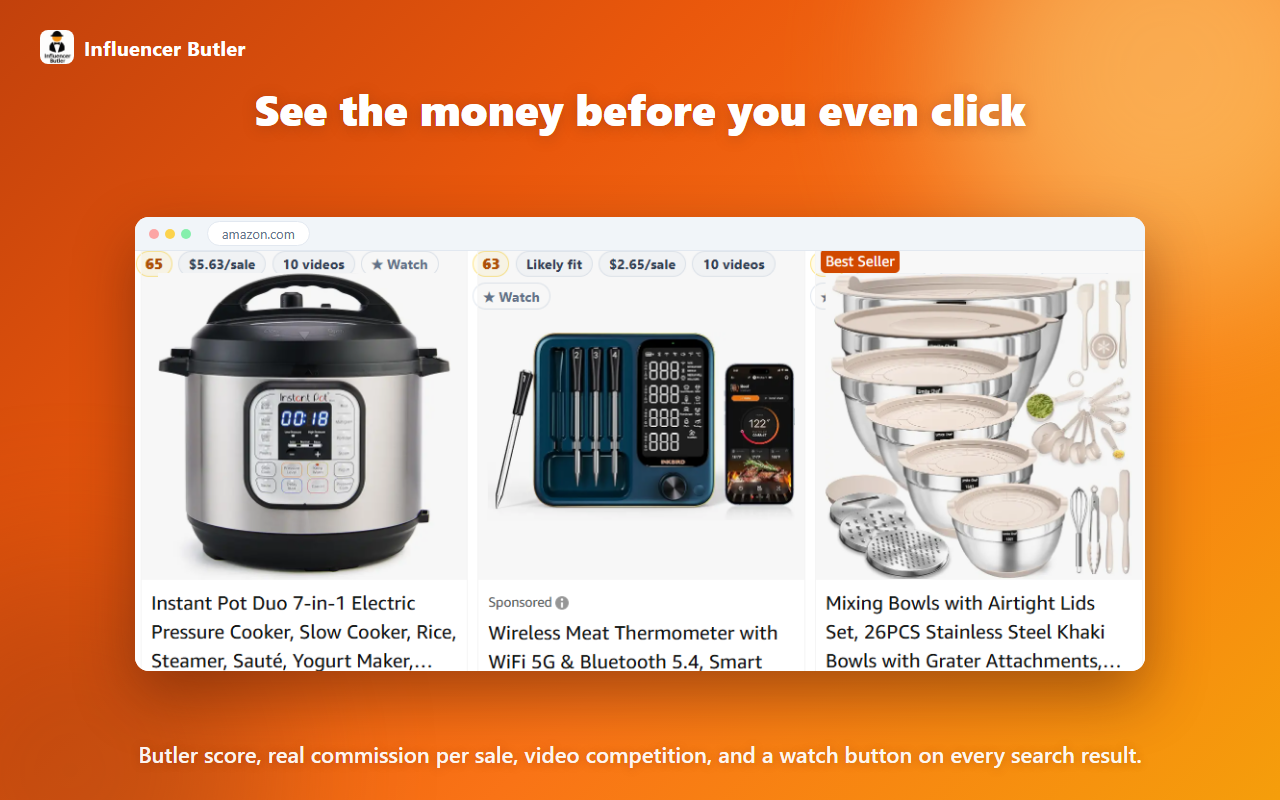
You open a search page and see sixty products. Which ones are actually worth a video? The Butler Score gives every product a single 0 to 100 number, so you can start with the best ones instead of clicking into every listing. Here is exactly how it is built, where the data comes from, and how to use it to pick what to film.
What the Butler Score is
The Influencer Butler Chrome extension reads the Amazon or Walmart page you already have open and adds a money layer: what a product could earn you, and whether there is room for your video. The Butler Score rolls that into one number, so a whole page of results can be sorted from most to least promising.
- 70 or higher: Hot pick
- 40 to 69: Worth a look
- Under 40: Low priority
The six signals
The points always add up to the score you see:
- Commission (30 points): dollars you would earn per sale. Full points at $5 or more per sale.
- Open video slot (25 points): fewer influencer videos already on the product scores higher. At six or more, this part drops to zero.
- Demand (20 points): Amazon's own "bought in past month" figure. Full points at 200 or more.
- In stock (10 points): whether people can actually buy it.
- Campaign (10 points): a bonus when a Creator Connections or Sponsored Products campaign exists for the product.
- Price (5 points): full points at $20 or more, so the effort is worth it.
If a signal has not loaded yet, it gets half credit instead of a penalty. Video counts, for example, are not on a search tile until you open the product or scan the page, so a thin tile is not unfairly sunk. As more data loads, the score sharpens.
Butler Approved and Likely fit
Separate from the score, a simple checklist marks a product Butler Approved when all four checks pass: 50 or more bought in the past month, 5 or fewer influencer videos, in stock, and a price of at least $20. If everything we can see passes but the video count has not loaded yet, it shows Likely fit. You can change those thresholds in the extension settings.
Where the numbers come from
Some numbers are read straight off the page. Others are looked up or estimated:
- Read from the page: price, deal badges, star rating, review count, and Amazon's bought-in-past-month figure.
- From each product page: stock, the number of influencer videos, Best Sellers Rank, and category. These load in your own browser for the results you scroll to.
- Commission rates: your live SiteStripe rate if it is on the page, otherwise the Amazon Associates rate card for the category, otherwise your saved default.
- Campaign rates: Creator Connections rates and end dates, refreshed daily, plus Amazon's own per-click forecast for Sponsored Products.
- Estimated sales: Amazon's bought figure when it is shown, otherwise modeled from sales rank and our shared catalogue.
- On Walmart: price, was price, and Rollback or Clearance badges are read from the page, and commission uses Walmart's published affiliate category rates. Sales and revenue estimates appear only when the shared catalogue has data for the item.
Facts versus estimates
Anything with a "~" is an estimate. Two things are worth remembering. First, "400+ bought" is a floor, so the real number is at least that. Second, estimated revenue is the product's total, not your earnings. Your earnings are the sales you drive times your commission rate.
How to use it to pick what to film
- Search your niche and sort by Best Butler Score.
- Look for Butler Approved or Likely fit.
- Check commission per sale, a Campaign chip, and any real Deal chip.
- Open the product to confirm the video count before you film.
Get the quick guide
We put all of this, plus a chip-by-chip glossary and a short FAQ, into a four-page PDF you can keep open while you browse: Download the PDF guide. For step-by-step setup, read the extension tutorial.
Share this post
Let a butler handle the busywork.
Influencer Butler automates the repetitive parts of running your creator business, from accepting Creator Connections campaigns to catching price drops and keeping your outreach moving. Try it free for 14 days.
Start your free trial