Video Reload Butler
Restores videos that Amazon removed, refreshes their info, and can flip them between horizontal and vertical for you.
Needs your OpenAI key Translated titles and captions use your own OpenAI API key. You pay OpenAI directly for what you use (usually pennies), not Influencer Butler, and a ChatGPT subscription does not work. Set up your OpenAI key.
A deleted video is gone. You lose the effort and the earnings.
Reloads them with clean metadata. Converts aspect ratios in one click.
How it saves you time, money, and headaches
- No more rebuilding your video library from scratch.
- Hours of re-filming or re-editing, gone.
- Earnings on missing videos brought back.
What’s in the box
- Reload videos Amazon removed
- Refresh titles and descriptions
- Convert horizontal ↔ vertical
- Duplicate detection before upload
- Queue with retry on failures
- CSV export of the restoration report
Reloads to 13 Amazon marketplaces
- United States - amazon.com
- Canada - amazon.ca
- United Kingdom - amazon.co.uk
- Australia - amazon.com.au
- Singapore - amazon.sg
- Germany - amazon.de
- France - amazon.fr
- Italy - amazon.it
- Spain - amazon.es
- Japan - amazon.co.jp
- India - amazon.in
- Mexico - amazon.com.mx
- Brazil - amazon.com.br
US, CA, UK, AU, and SG are fully tested. The eight non-English markets are in beta while we finish per-market testing.
Posts in each country's language
For every non-English marketplace, Video Reload Butler translates the post title and burns local-language captions right into the video, so your German post reads in German and your Japanese post reads in Japanese. English markets post unchanged. It runs once per language, so a fan-out to several countries stays fast. Turn it on under Localize for each marketplace. Translation uses your own OpenAI key (you pay OpenAI directly, usually pennies; a ChatGPT subscription does not work).
Watch the 4-minute walkthrough
One Video, Every Marketplace: Video Reload Butler. Recorded inside the app and narrated start to finish.
Read the video transcript
Filmed once, sold once. You filmed a product for the US storefront. That same video could be earning in Canada, the UK, Australia and Singapore, and a re-upload with a fresh title gets treated like a new post. Video Reload Butler does the copying.
Included in the Beginner plan. Quick note on plans. Video Reload Butler is included in the Beginner plan, so everyone has it.
It reads Storefront Butler. It reads your videos from the Storefront Butler table, so sync that first. And it publishes to your real storefronts, so nothing is run on camera today.
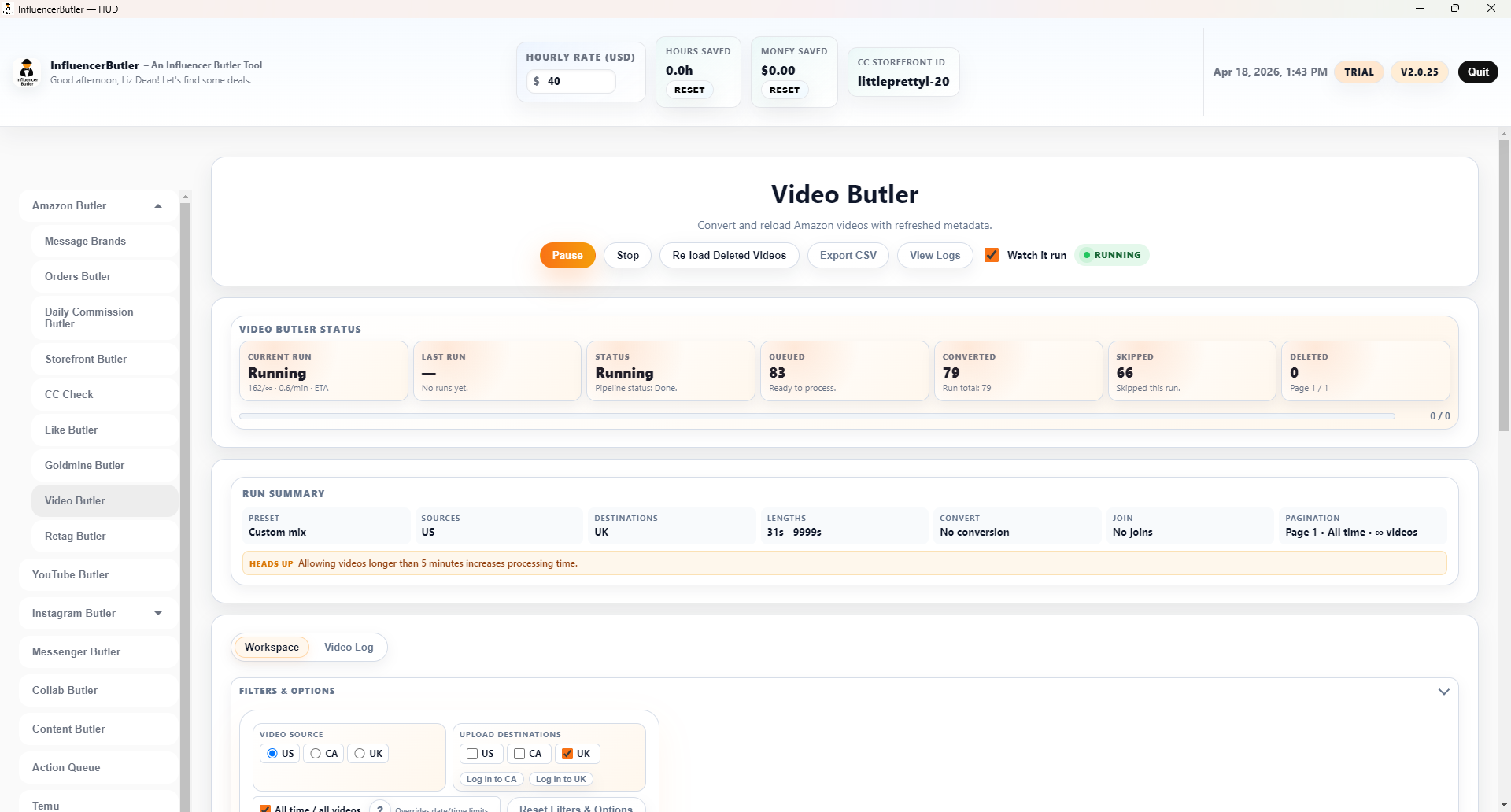
Step 1: source and destinations. Five steps, top to bottom. Step one: Video source is the marketplace your videos live on, usually US. Upload destinations are where the copies go, each with its own sign-in.
Start with one destination. Tick one destination on your first run and see how it lands. Amazon now cross-posts to some markets on its own, marked Amazon auto, so the others are where uploading yourself adds reach.
Skip unavailable products. Skip products that are currently unavailable checks stock before uploading, so you never post a dead link.
Step 2: preferred formulas. Step two starts with Preferred Formulas: one-click mixes for the common paths, like monetizable videos to the four markets, a US re-upload of short verticals, or reload my proven winners. Press one and every filter fills in.
The formulas. Each formula has a question mark explaining what it sets. Everything stays editable afterwards.
Timeframe and batch size. Timeframe narrows by date, and Max videos this run caps the batch. A handful the first time tells you whether you like the result.
Quality guardrails. Quality guardrails keep your best work untouched: skip videos at or above a view count, skip below a minimum, or reload only videos above a minimum percent viewed.
Step 3: transform. Step three transforms the video: convert to vertical, horizontal or square, trim or loop to a target length, join a clip, add a watermark, a caption, or an AI thumbnail.
Run mode. Now the setting to read twice. Run mode decides what happens to the original. Post and keep original copies and leaves everything alone. The delete modes remove the original from Amazon.
Winners first and fresh titles. Winners first reloads only videos whose products earned commissions. Refresh the title on reload gives each copy a new hook so Amazon treats it as a new post.
Pace it. Minimum and maximum seconds between uploads, Limit uploads per day, and Warm up slowly keep a big library from going out all at once.
Run. Run opens Chrome, converts each video, and uploads it to the destinations you ticked. Watch it run in the top bar keeps the browser on screen. The Video Log tab records every upload, and Deleted from Amazon keeps a local copy of anything removed.
Next step. Your next step: one destination, max five videos, Post and keep original. Run it, check the Video Log, then pick a formula.