Shopping Butler
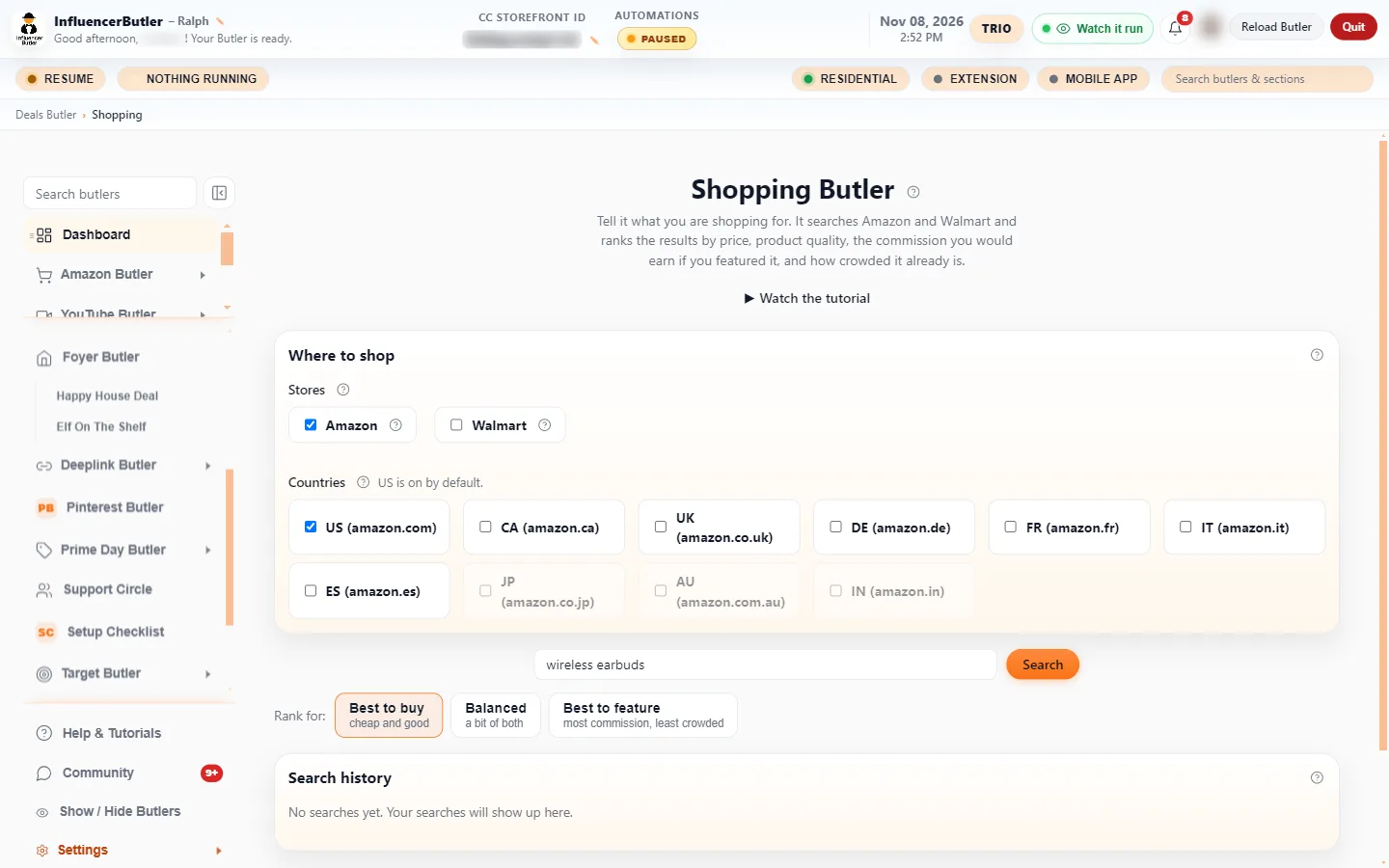
Type what you’re shopping for. It searches Amazon and Walmart at once and ranks every result by price, quality, the commission you’d earn, and how crowded it already is.
Open Amazon in one tab and Walmart in another, compare prices and ratings by hand, then guess which one is worth a video.
One search covers both stores. The best product to buy, and the best one to feature, are sorted to the top for you.
How it saves you time, money, and headaches
- Find the cheapest, best-rated option without tab-hopping between two stores.
- See at a glance which product pays you the most to feature, not just which is popular.
- Spot the open lane: a great product that few creators have covered yet.
What’s in the box
- One search across Amazon and Walmart, with live prices and star ratings
- Three ranking modes: Best to buy (cheap and good), Balanced, and Best to feature (most commission, least crowded)
- Your estimated commission per sale, including any Creator Connections or SPCC uplift, shown per row
- Saturation check that counts the real number of creator videos already on a product’s Amazon page
- Same product from both stores collapses to one row, with an “also cheaper at” note
- Switch ranking modes instantly, with no new search
- Reads your commission rates from the tools you already use, so there’s nothing extra to set up
Watch the 2-minute walkthrough
Shopping Butler: Find The Best Product To Buy Or Feature. Recorded inside the app and narrated start to finish.
Read the video transcript
Which one should you buy, or feature?. You need a laptop stand. Which one is the best buy? And which one would earn you the most if you featured it? Shopping Butler answers both in one search.
Included in the Beginner plan. A quick note on plans. Shopping Butler is free, and it is included in the Beginner plan. Everyone has it. It is a shopper's tool, not a poster, so there is nothing to run or schedule.
Where to shop. Where to shop sits above the search box. Tick Amazon, Walmart, or both. Both are on by default, and your choices are saved for next time.
Countries. Countries picks which Amazon sites to search. US is on by default. Other countries use your own Amazon keys from AI and Data Keys, so they stay greyed out until you connect them. Walmart is US only.
Type what you are shopping for. Type what you are shopping for, in plain words.
Search. Press Search. It searches Amazon and Walmart at the same time and scores every product it finds.
Searching both stores. This takes a moment, because it is reading real product pages. Each result gets four scores: price, product quality from its rating and reviews, the commission you would earn, and how crowded it already is.
Rank for: buy, balanced, or feature. Rank for switches the order. Best to buy puts cheap and good first. Best to feature puts the most commission and the least crowded first. Balanced is a bit of both.
The results. Here are the results. Each card shows the price, the rating, what you would earn, and how many creator videos already cover it. A great product nobody has covered yet is your best opening.
Check saturation. Check saturation looks up the real number of creator videos on each product's Amazon page. It is optional, and it takes a little longer.
Cards or table. Switch to Table when you want to compare the numbers side by side.
Next step. Found a winner? Buy it for your next review video, or feature it as a deal. Your next step: type what you are shopping for and press Search.