
Product research and Creator Connections intel, on the Amazon and Walmart pages you already browse.
Free. Never throttled.
Butler Score, BSR and revenue estimates, price history, influencer vs brand video counts, Campaign Radar with fill meters and Last Call alerts, campaign accept with no desktop app, deep links that open the Amazon app, localized links for 12 marketplaces, and Walmart, Target, and Benable support: 15 tools, all while you shop like normal.
Works on Mac and Windows: Chrome, Edge, or Brave.
- Every tool, no card
- $0
- Tools in your browser
- 15
- Marketplaces linked
- 12
- Butlers it syncs with
- 50+
See it on the page
The whole money panel, right where you shop.
One floating panel on every Amazon product page, from your deep link and Product Snapshot at the top, through the video competition, down to the break-even math at the bottom. No tab-switching, no separate dashboard, no throttling.
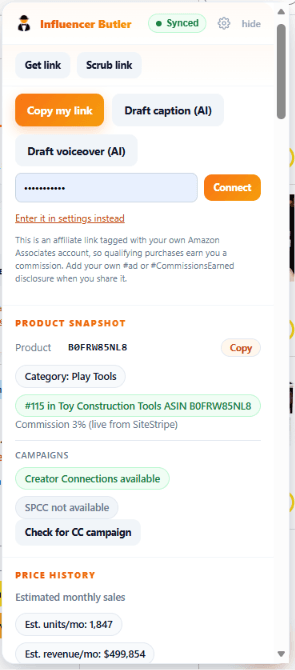
Deep link and Product Snapshot
Your tagged link, live commission from SiteStripe, Creator Connections status, and price history.
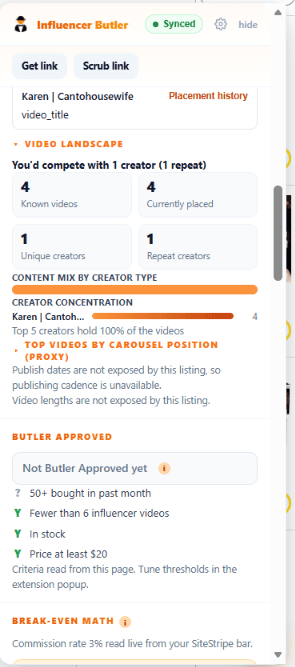
Video Landscape and Butler Approved
Who you would compete with, the content mix by creator type, and the pass or fail Butler Approved criteria.
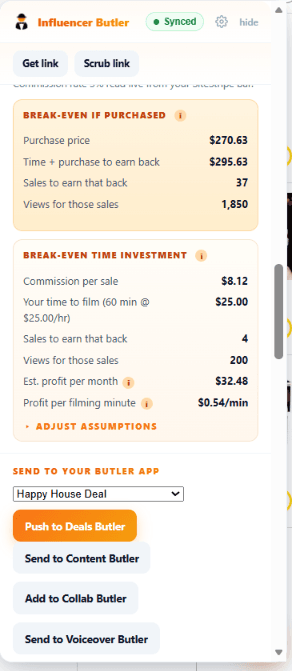
Break-even math
Sales and views to earn back your time, profit per filming minute, and one tap to send it to a butler.
The toolkit
15 tools that live where you shop.
Seven groups, in the order a creator meets them: research the product, read and accept the campaign, trust the pacing, get the link, go global, keep the storefront clean and see what your videos earn.
Product research
The whole picture on every product page
A 0 to 100 number and a green light you can trust
Butler Score + Butler Approved seal
Every product page gets a Butler Score with a hover breakdown of where the points came from, next to the Butler Approved seal: actively selling, an open influencer slot in the carousel, in stock, and above your price floor. Each criterion shows pass or fail so you know why.
Sales rank, estimated monthly units, and a sparkline
BSR + estimated revenue with price and rank history
Reads the Best Sellers Rank on the page, turns it into estimated monthly units and revenue, and draws a price-history sparkline (plus sales-rank history when the desktop app is paired), so you can see whether a product is climbing or fading.
Know the carousel before you film
Video Scanner
Counts the videos on any product and who made them: influencer, brand, or customer, with an open-slot indicator for the upper carousel. The exact competition picture other tools charge monthly for, free while you browse.
Money signals on Best Sellers, New Releases, and Movers & Shakers
Trend Radar
Badges every tile on Amazon's discovery grids with its Butler Score, estimated $ per sale, and video count, with a toolbar to sort and filter by what pays, so the best opportunities on a page jump out.
Film what you already own
Content Gap Finder + Orders Butler
One click on your order history flags the products you bought that have few or zero influencer videos, and Orders Butler syncs your whole purchase history to your dashboard, the same pull the desktop runner does.
Creator Connections
Score, brief, and accept campaigns without leaving the grid
Score chips, fill meters, and Last Call watch bells
Campaign Radar
Every card on the Creator Connections grid gets an opportunity score, chips for products you already own or have earned on, a fill meter showing how full the campaign is, and a watch bell that alerts you before a nearly full campaign closes.
The Butler's Brief, then your best message
Campaign Butler brief + message templates
Open a campaign and get The Butler's Brief: a verdict, why to take it, what to film, and which product to lead with. Then drop a saved message template into the Creator Connections composer with placeholders filled in.
Score the pay-per-click tab by Amazon's own EPC
Sponsored Products scoring
On the Sponsored Products for Creators tab, every card is scored on Amazon's Estimated EPC and budget availability, plus whether you already own or have earned on the product, and a strong-picks filter keeps only the top band.
Work your Creator Connections inbox faster
Messages drawer cards
Each brand in the Messages drawer shows its best rate, days left, and open slots. Filter to unread, live campaigns, or brands you pitched, jump to the next unread, and accept the brand's best live campaign from the thread.
Accept from the panel, or let Auto mode do it within your caps
One-tap accept and Auto mode, no desktop app needed
Accept Creator Connections and Sponsored Products campaigns from the product panel or a search tile, and submit your own storefront video as the content link. Optional Auto mode checks every 30 minutes while Chrome is open and accepts only what matches your rules, within daily caps. The desktop app is not required.
Never throttled
One polite request at a time, so Amazon never blocks you
One polite request at a time. Every scan runs through a single serialized fetcher with a 2.5 to 4 second jittered gap, watches for Amazon's robot check and backs off, and caps each run. You never see a screen of death.
- •Product pages are read in place: the page you are already looking at is the data source, so nothing extra is fetched to show the panel.
- •Order, storefront, and grid scans queue through one fetcher and wait 2.5 to 4 seconds between pages, jittered so it reads like a person browsing.
- •If Amazon serves a robot check, the run stops and automatic enrichment pauses for ten minutes instead of hammering the block.
- •Every run has a cap (20 orders, 25 storefront videos, 40 deal pages, 200 order-history pages), so a parsing miss can never turn into an unbounded crawl.
Fast
Reads the page you are already on, so results are instant
- •The panel reads the product page you already opened, so the score, video counts, and seal appear as the page hydrates.
- •Scan results are cached for a week, so revisiting a product or re-opening a grid is instant.
- •Nothing runs in the background: the only waits are the deliberate pauses inside a scan you clicked.
Deep links
Your affiliate link, one tap, opens the Amazon app
Your affiliate link on every product, free
My Link / Get link
Get link sits pinned at the top of the panel: one tap builds your own tagged Amazon link for the product on screen, and it opens the Amazon app on a phone so viewers land in the app, not a browser tab.
A short link you own, with clicks by day and country
Branded short links with the Deeplink Butler click ledger
Sign in with your Influencer Butler license key and mint branded short links, then watch clicks by day, country, device, and surface in the Deeplink Butler ledger. If a product goes unavailable, repoint the same link so old posts keep earning.
Global Maximizer
Localized links for 12 marketplaces
Localized links for 12 marketplaces
Global Maximizer
For the product on screen, one row per marketplace (US, CA, UK, AU, DE, FR, IT, ES, JP, IN, MX, BR) with availability, local price, and an estimated commission per sale, plus a localized affiliate link for each and a copy-all for the whole set.
Storefront Checkup
Stop leaking commissions on your own shop
Stop leaking commissions
Storefront Checkup
One click checks your storefront videos for missing product tags, over-tagging that dilutes clicks, and tagged products that have gone unavailable, and exports the results as a CSV.
See which of your videos actually earn
Video Money + YouTube status
On Creator Hub, every video row shows what it earned, its earnings per view, the live commission rate, and a demand badge, plus a chip for whether it is already on YouTube with an Upload button when it is not. Earnings and uploads use the paired desktop app.
Also in the box: Walmart, Target, Benable, and more
- Walmart: Price, rating, estimated commission, and a Butler Score on Walmart product pages, a Send to Deals Butler button, and tracked Walmart links through Mavely or Walmart Creator.
- Target and cross-retailer card: Money signals on Target product pages, plus an Also on Walmart or Target card that matches the same product by UPC.
- Benable: A Butler badge on every Amazon product in a Benable list, with commission, campaign eligibility, and demand.
- Deal Sites Harvester: Collect the deals from a deal roundup page you visit into one table, each with your own affiliate link.
- Idea List capture: Queue any product you are browsing into an Amazon Idea List, with money signals badged on every Idea List page.
Why pay?
Everything they sell. Nothing to buy.
| Feature | Influencer Butler | Typical paid extensions |
|---|---|---|
| Price | Free | $25-$50/mo |
| Butler Score with a visible breakdown | Yes | Rarely |
| BSR, revenue estimate, and price history on the page | Yes | Sometimes |
| Influencer vs brand vs customer video counts | Yes | Sometimes |
| Content gaps from your order history | Yes | Usually a paid tier |
| Creator Connections radar with fill meters and Last Call alerts | Yes | Rarely |
| Throttle-free paced scans | Yes | Often rate-limited |
| Deep links that open the Amazon app | Yes, free | Usually a paid tier |
| Localized links for 12 marketplaces | Yes | Rarely |
| Storefront untagged and dead-product checks | Yes | Usually a paid tier |
| Accepts Creator Connections campaigns without a desktop app | Yes | Rarely |
| Walmart, Target, and Benable support | Yes | Usually separate tools |
| Syncs with a full automation suite (50+ butlers) | Yes | No |
Based on typical pricing and feature tiers of paid Amazon influencer browser tools as of mid-2026.
Better together
Your browser finds it. Your butler acts on it.
Connect the extension with your Influencer Butler license key and everything it finds syncs to your dashboard: every product scan, every content gap, every storefront issue. Pair the desktop app and the panel gains Accept buttons for campaigns, your real earnings per product, and the app's full price and rank history, so an opportunity you spot while shopping becomes an action item where you work.
- 1.Install the extension and browse Amazon like normal.
- 2.Paste your license key in the popup (optional, free trial keys work too).
- 3.Open your dashboard and see everything your butler saw.
No desktop app yet?
The extension is free either way, and the desktop app has free butlers too: Like Butler, Benable Like Butler, Instagram Like Butler, CC Check, Orders Butler, and Storefront Butler stay free forever. When you are ready to automate the rest of your influencer business (deal posting, Creator Connections outreach, commission tracking, and 50+ other butlers), start a 14-day Pro trial.
The only full-Pro 14-day trial in the category: every butler unlocked, not a lite tier.
Explore the desktop appWhich one do I need?
Extension vs Desktop App
The free extension does the research and reads the Creator Connections grid while you browse. The desktop app does the automation: posting, outreach, accepting, and scheduling. Here is exactly what each one does.
| Feature | Free Extension | Desktop App (Pro) |
|---|---|---|
| Product research while you browse (Butler Score, BSR + revenue, price history, video counts, content gaps) | ✓ | ✓ |
| Creator Connections Campaign Radar: score chips, fill meters, Last Call watch bells | ✓ | ✗ |
| Campaign accept, one-offs and Auto mode (runs while Chrome is open) | ✓ | ✓ |
| Sponsored Products for Creators scoring (EPC and budget) | ✓ | ✗ |
| Creator Connections auto-outreach | ✗ | ✓ |
| Deep linking (free tagged link that opens the Amazon app; branded short links with a free sign-in) | ✓ | ✓ |
| Localized links for 12 marketplaces (Global Maximizer) | ✓ | ✗ |
| Deal Sites Harvester (turn deal lists into deals) | ✓ | ✓ |
| Walmart, Target, and Benable overlays (Walmart products can be sent to your Deal Posting) | ✓ | Receives and posts the deals |
| Auto-post deals to Facebook, Instagram, and more | ✗ | ✓ |
| Scheduling and autopilot posting | ✗ | ✓ |
| Like Butler (auto-like storefronts) | ✗ | ✓ |
| Auto video uploads | ✗ | ✓ |
| Commission tracking dashboard | Reads your desktop earnings when paired | ✓ |
| Runs 24/7 on your own PC | ✗ | ✓ |
| Price | Free | From $39/mo |
In short: use the free extension to research products and read campaigns, then add the desktop app when you want to automate posting, outreach, accepting, and scheduling. Auto-posting is a desktop-app feature and does not run from the extension.
FAQ
Fair questions.
Is it really free?
Yes. Every tool in the extension works without an account and without a card. If you also use the Influencer Butler desktop app, connecting your license key syncs your findings to your dashboard, but that is optional.
Does it throttle or get me blocked?
No. One polite request at a time. Every scan runs through a single serialized fetcher with a 2.5 to 4 second jittered gap, watches for Amazon's robot check and backs off, and caps each run. You never see a screen of death. Scans only start when you click a scan button, and the panel itself reads the page you are already on.
Does Influencer Butler give me a deep link?
Yes: Get link builds your own tagged Amazon link for the product on screen, free, and it opens the Amazon app on a phone; branded short links with a click ledger are optional and unlock with a free sign-in.
Do I need the desktop app?
No. The extension stands on its own, including accepting Creator Connections campaigns, scoring them, and optional Auto mode. The desktop app adds the automation side: posting, deal harvesting, Creator Connections outreach, real earnings on the money tools, and more, and the two are better together.
How does it count influencer videos?
It reads the video carousel data already on the product page you are viewing and classifies each video by its creator type. Nothing is crawled in the background; scans of your orders and storefront only run when you click the button.
Is my data private?
The extension stores everything locally in your browser. Findings leave your machine only if you connect your license key and keep sync turned on, and then only to your own Influencer Butler dashboard. No tracking, no analytics, no sale of data: read the full extension privacy policy at influencerbutler.com/extension/privacy.
Does it work on Mac?
Yes. It is a browser extension, so the same install works the same on Mac, Windows, and Linux in Chrome, Microsoft Edge, or Brave. There is nothing separate to download. Safari uses a different extension system and is not supported yet, so on a Mac just use Chrome, Edge, or Brave.
Which marketplaces are supported?
The full on-page panel and the Creator Connections tools are built and checked on Amazon.com, .ca, and .co.uk. Global Maximizer builds localized links for 12 marketplaces (US, CA, UK, AU, DE, FR, IT, ES, JP, IN, MX, BR), and the extension also loads on those other Amazon storefronts while we verify the full panel on each. Walmart, Target, and Benable are covered too.
Does it work on Walmart, Target, or Benable?
Yes. On Walmart product pages it shows the price, rating, estimated commission, and Butler Score, and copies tracked Walmart links when Mavely or Walmart Creator is connected. Target pages get money signals and an Also on Walmart or Target card. Benable lists get a Butler badge on every Amazon product.
Stop guessing which products deserve a video.
Install the free extension and see the whole picture on every product page and every campaign card.